Showing posts with label Data Center. Show all posts

Saturday, February 4, 2017

Advice on Server Rack Cable Management

The proliferation of the cloud network and virtualization has brought higher network demands, which means data centers and network closets need to house and support an abundance of power and data cables. It is obvious that fail to deliver proficient cable management within a server rack can be devastated, either for network efficiency and performance, or for the overall look of the data center. The biggest challenge therefore is server rack cable management. This article intends to guide you through the process of achieving effective server rack cable management.
rack cable management
Benefits of Server Rack Cable Management
Here comes a frequently asked question: what exactly can data center operators benefit from valid rack cable management? The aspects listed below may explain.
Improved system performance: rack cable management incline to separate power and data cables within the racks, which greatly decrease the chance for crosstalk and interference between power and data cables.
Enhanced availability: mess of cable sometimes may confuse data center operators, resulting in human error that leads to an assortment of problems to the overall system. Effective rack cable management allows easier cable and IT device management, yet to reduce human error.
Improved maintenance and serviceability: effective rack cable management also ensures easier and safer access to individual components.
Increased cooling efficiency: by allowing hot exhaust air to escape out the back of the rack, cable management keeps cables organized and out of critical airflow paths.
Improved scalability: rack cable management simplifies moves, adds, and changes, making it easier to integrate additional racks and components for future growth.
Steps for Achieving Server Rack Cable Management
Then, we have made clear the importance and advantage of rack cable management. But how to achieve a well-organized and aesthetic appealing data center? We offer this seven-step guide for successful rack cable management.
Step One: Plan appropriately. Planning serves as the very primary stage for power and data cable management in server racks. An appropriate planning contributes to deliver smooth rack cable management process. Consulting a professional cabling contractor can be beneficial to complete the entire project.
Step Two: Determine the routes for power cables and data cables. First to consider if the power and data cabling will enter from the top or bottom of the rack. Then, determine the routes to separate power and data cables, and copper data cables and fiber. This helps to prevent erratic or interference from degrading the performance of the system.
separate power cable and data cableseparate fiber and copper cable
Step Three: Identify cables. Good cable identification and administration are investments in infrastructure. Implement best practices like using colored cables as well as labeling cables to ensure easier cable identification, which contributes a lot to rack cable management.
labeling cable for cable management in rack
Step Four: Route and retain cables. Cables must be protected at points where they might rub or contact with sharp edges or heated areas. Rack cable management accessories like flexible cable tie and cable management arms can be used to route and retain cables.
Step Five: Secure cables and connectors. Cables and connectors should be secured to prevent excessive movement and to provide strain relief of critical points.
Step Six: Avoid thermal issues. Ensure the airflow path is rather important, since restrained airflow can cause temperatures rise. Sustained higher temperatures can shorten devices’ expected lifespan and lead to unexpected failures, resulting in unscheduled system downtime.
Step Seven: Document and maintain organization. Documenting the complete infrastructure including diagrams, cable types, patching information, and cable counts is important for future cable management. IT managers should commit to constructing standard procedures and verifying that they are carried out.
Conclusion
Effective rack cable management helps to improve physical appearance, cable traceability, airflow, cooling efficiency and troubleshooting time while eliminates the chance for human error. Meanwhile, power and data cable management within server racks also ensures the health and longevity of your cables. Hope what we discussed in the article is informative enough.

Monday, October 24, 2016

Use PDU to Enhance Data Center Energy Efficiency

The tendency to increase server and rack power densities has inevitably led to cable and power management complexities. And this is a huge problem that many data center managers may encounter. Thus, to implement a power distribution unit (PDU) serves as a vital primary step in simplifying cable management and powering your high-density network environment. It means that when you demand for reliable, flexible and easy-to-install power distribution to maximum network uptime and to save energy costs. PDU can be an optimum solution for you.

A power distribution unit (PDU) is a type of electrical component that distributes and manages electricity supply to computers, servers and networking devices within a data center. It is known that in a network environment, servers, storage and networking equipment can only operate when there is power to drive them. Thus, a PDU provides a central unit to control and distribute electricity, and supply to the rack via multiple outlets to the rack’s servers and critical IT equipment.
Capable of managing and distribute large amount of electricity, PDU is usually directly installed in the rack. Moreover, it can also be connected and accessed over the network or in the remote distance, and provide statistics and data on the power usage effectiveness (PUE).
power distribution unit (PDU)

Benefits of Employing Power Distribution Unit (PDU)

PDU is designed for simpler and more cost-effective power distribution. And it obtains the following several advantages:

Simplify deployment: The PDU features space-saving, which conserves precious space for network applications, effectively simplify cable management complexities and increase system accessibility. And ultimately contributes to reducing installation time.

Minimize downtime: Rack environments nowadays are more inclined to continuously increase power density. And it happens sometimes to add load in the wrong place and trigger an overload event. The PDU, however, is capable of minimizing this impact to maximum your uptime, achieving high network availability.

Increase power density: PDU is designed to fix your problems of high-density data center environment, and to meet the requirements of your most power-demanding and highest-availability systems.

Streamline cabling: By connecting multiple rack devices to a single PDU using short, easy-to-manage cables, you can significantly reduce the number of power cords extending from the rack to the wall, alleviating clutter and simplifying power distribution.
PDU

Five Methods to Enhance Energy Efficiency With PDU

Apparently, the cost concerning energy consumption can be the biggest operating expense in your data center. And here comes to the main purpose of this article: how to improve energy efficiency by the adoption of PDU? Today’s PDU allows data center managers to monitor power use, energy efficiency and environment condition. So, it is possible to make powerful, well-informed decisions to lower energy usage, without negatively impacting data center performance or reliability. There are basically five ways.

Calculate power usage effectiveness (PUE)

PUE helps data center engineers determine energy efficiency by measuring how effectively data centers use input power. It provides insights into efficiency efforts, and can also help determine when something has gone wrong. PDUs can provide power data and help you calculate PUE at a granular level. Total power used in each rack can be compared to the building’s overall power usage to create the foundation for PUE calculation.

Monitor energy-usage trends

Monitoring energy usage enables you to know when consumption gets out of hand. And monitoring each of your PDUs individually would be extremely difficult. However, collecting the information in a database allows you to monitor rack-level power information, store the data, trend it and then use it to make decisions about your data center. When a PDU is reaching its total power capacity level, it can alert the data center manager before breaker capacity is reached and let him/her know that it’s time to bring in more PDUs to prevent outages to computing gears.

Improve capacity planning

When you employ PDUs to perform outlet-level monitoring, you can pinpoint areas within the data center where simple equipment rearrangement may free up power or improve safety by moving equipment that is close to circuit limit. PDUs monitor temperature and other environmental conditions to make sure the performance hasn’t been compromised.

Optimize device-level performance

As you can calculate operating costs of each device, and know how much power each device uses, it is easier to identify the energy hogs. Meanwhile, you can also use device-level performance metrics to determine whether a more efficient device would be worth the investment. PDUs can also identify equipment that is no longer needed. For example, when a PDU indicates that a certain server is running at an average of 35% of peak power, this server can be marked to be replaced.

Quickly correct environmental changes

PDU can identify failed power supply, temperature increases, a sudden surge in power usage. When PDUs alert you to these types of environmental or performance changes via e-mail or text, you should take action before they become a major issue which would lead to downtime and lost revenue.

Conclusion

For each and every data center, reliability is rather critical. PDUs are able to provide robust, reliable power to rack and cabinet applications. And they enable data center managers to enhance energy efficiency by optimizing power capacity, saving large amount of cost, as well as to maximum network uptime. FS.COM offers a wide range of PDUs that are distinguished by their quality, dependability and versatility in electrical applications. Our PDUs are designed specifically to help data center professionals meet rapidly escalating power requirements. For more information, visit www.fs.com.

Friday, April 29, 2016

How to Clean the Data Center?

Dust and dirt in data center could be a nightmare that troubles most of the telecom engineers. Now and then as they try to put their fingers on a distribution cabinet or a patch panel in a data center, the fingers are always stained by dust or dirt. However, this annoying situation is not rare for those engineers working in the field of telecommunication. Some of them may have realized the importance of cleanliness in data center, but they seldom take action to remove the dust and dirt. It means people simply attach less importance to keep the data center clean enough. Some contaminants can easily be seen or checked by eyes and hands, but there are still myriads of them existing inside the equipment which may lead to disastrous consequences such as overheating as well as various network failures if no proper action was taken to clean.

The Importance of Cleaning Data Center
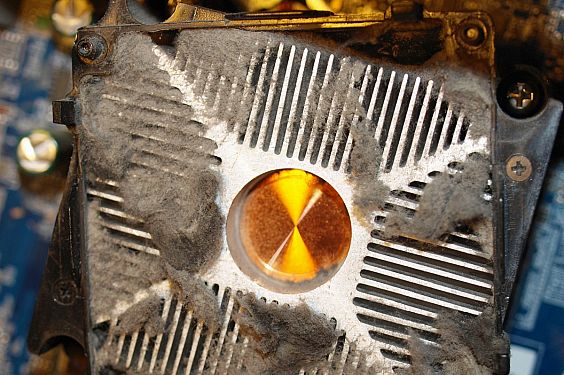
Imagine what would happen if there is no regular cleaning in the data center? As it was mentioned above, the most direct result of contaminant is overheating. Since dust and pollutants in the data center are usually light-weight, If there is air flow, dust or dirt will move with it. The cooling system of the data center is depending largely on server fan which can bring the dust and dirt into the cooling system. The accumulation of these contaminant can cause fan failure or static discharge inside equipment. The heat dissipation will need more time and heat emission efficiency is limited. The following picture shows the contaminant at a server fan air intake that can explain this phenomenon.

the contaminant at a server fan air intake

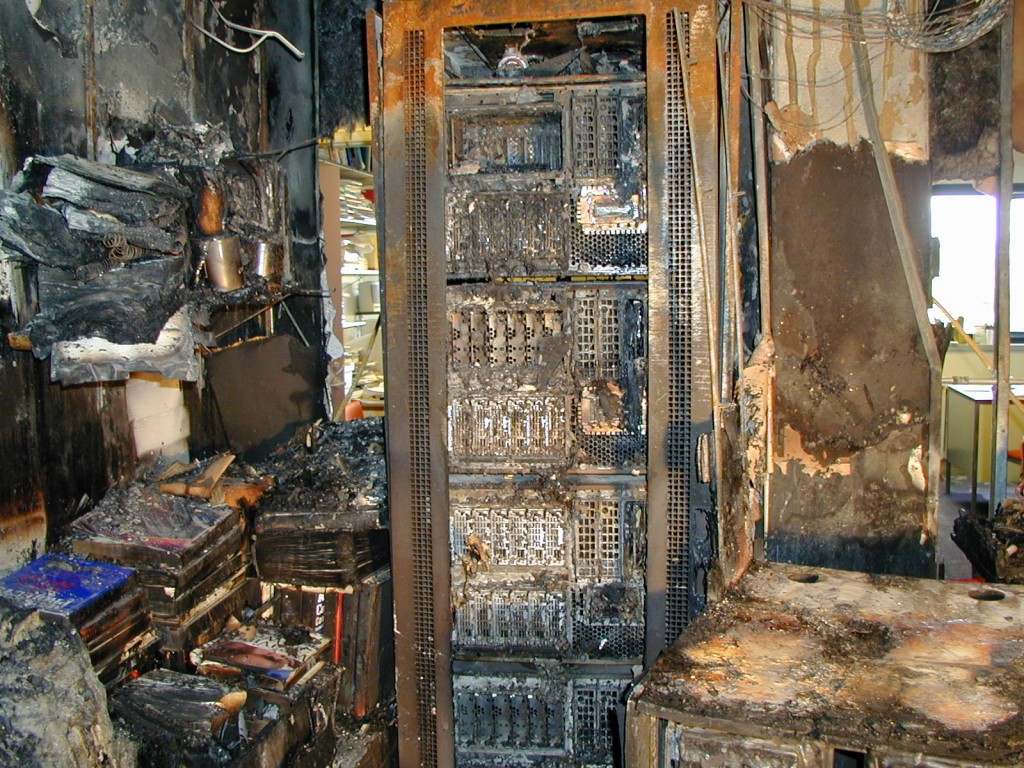
As the cooling system is affected by the dust and dirt, the risk of the data center increases largely. Contaminants will capture every possible place in the data center where they are capable of. In addition, data center nowadays relies heavily on electronic equipment and fiber optic components like fiber optic connectors, which are very sensitive to contaminants. Problems like power failures, loss of data and short circuit might happen if the contaminants are not removed completely. What’s worse, short circuit might cause fire in the data center, which could lead to irreparable damage. The following picture shows the data center after a fire. It is really a disaster for the data center managers.

the data center after a fire


Dust and dirt can also influence the life span of data center equipment as well as their operation. The uptime of a data center may decrease if there are too many contaminants. Cleaning the data center regularly would help to reduce data center downtime and extend the life span of data center infrastructure equipment. It is proved to be cost efficient and energy saving comparing with restarting the data center or repairing the equipment.
Furthermore, data center cleanliness can offer an aesthetic appeal to a clean and dust-free environment. Although it is not the main purpose, a clean data center can present a more desirable working environment for telecom engineers, especially for those who need to install cable under a raised floor or working overhead racks and cabinet. No one would reject a cleaning data center.

Contaminants Sources of Data Center
There is no doubt that data center cleanliness is necessary. But how to keep the data center clean? Before taking action, source of contaminants in the data center should be taken into consideration. Generally, there are two main sources. One is inside the data center, and the other is from outside of the data center. The internal contaminants are usually particles from air conditioning unit fan belt wear, toner dust, packaging and construction materials, human hair and clothing as well as zinc whiskers from electroplated steel floor plates. The external sources of contamination include cars, electricity generation, sea salt, natural and artificial fibers, plant pollen and wind-blown dust.

Data Center Cleaning and Contaminants Prevention
Having known where the dust and dirt come from, here offers some suggestions and tips to reduce the contaminants.
  • Reduce the data center access. It is recommended that limited access to only necessary personnel can reduce the external contaminants.
  • Sticky mats should be used at the entrances to the raised floor, which can eliminate the contaminants from shoes largely.
  • Never unpack new equipment inside the data center, establish a staging area outside the data center for unpacking and assembling equipment.
  • No food, drink or smoking in the data center.
  • Typically all sites are required to have fresh air make-up to the data center, remember to replace on a regular basis.
  • Cleaning frequency depends on activity in the data center. Floor vacuuming should be more often as the traffic in the data center increased.
  • Inspect and clean the fiber optic components regularly, especially for fiber optic connector and interface of switches and transceivers.
  • The inside and outside of racks and cabinets should be cleaned.
Conclusion
Data center operates like an information factory nowadays as it processes countless data and information as well. Therefore, the cleanliness of the data center becomes increasingly important. If this essential “factory” is polluted by dust and dirt, it will eventually fail to provide reliable and qualified services. Not to mention that a clean data center could ensure a much more extended life span of equipment and applications thus to effectively save a great amount of money for the maintenance.